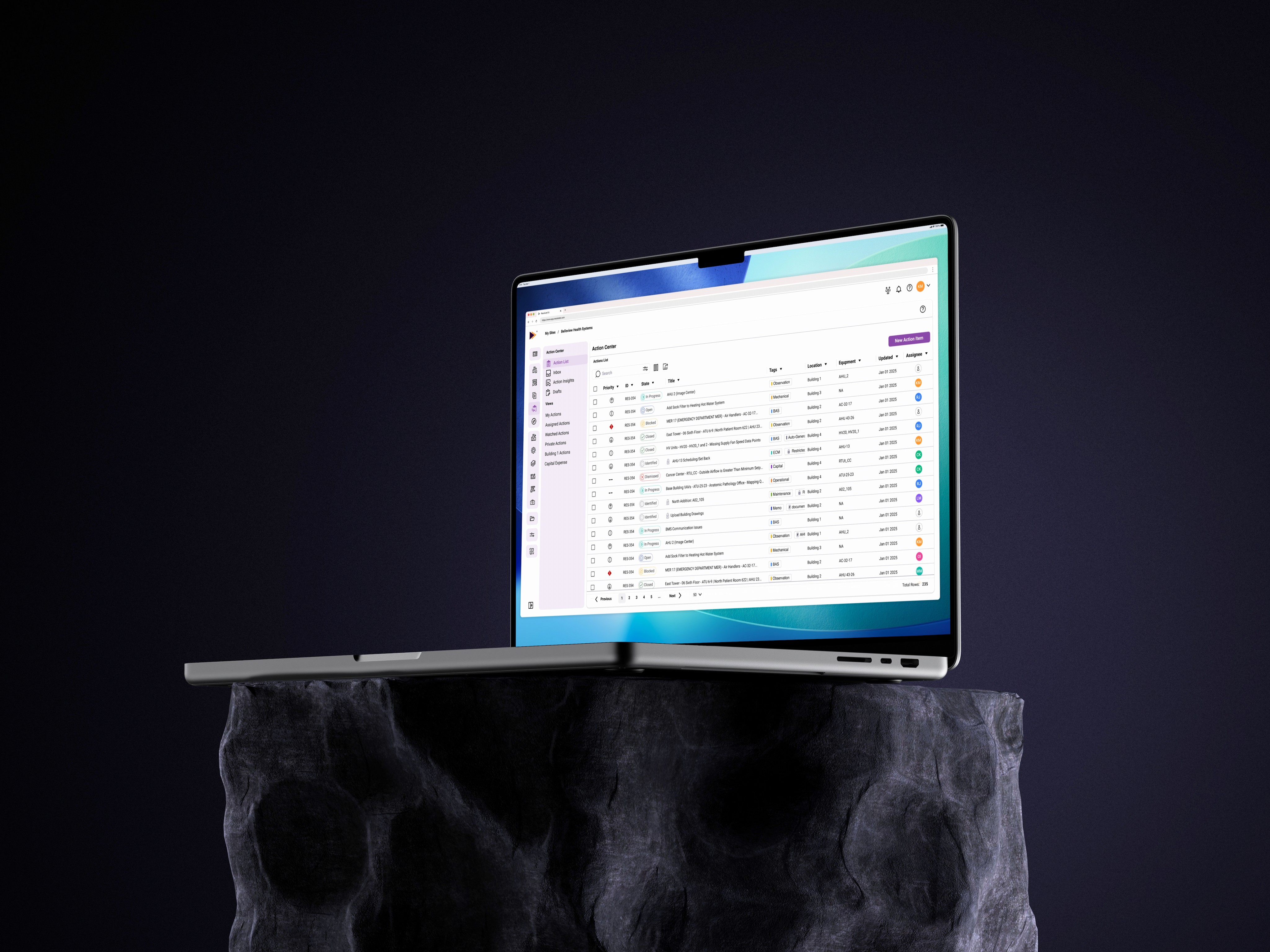
Resolute B.I.
Web
My Role
Lead Designer
UX Research
Background
Resolute Building Intelligence provides fault detection, analytics, and reporting solutions through its two applications, Synergy and Fusion. By connecting to a building’s existing BAS, Resolute BI delivers insights using rule-based analytics and reports, helping users better understand performance and identify potential issues.
Action Center is a task management feature designed to help facilities teams track, prioritize, and resolve those issues. It started as a simple task tool but gradually expanded into a central communication hub. As new functionality was added over time, updates were made where they could fit rather than as part of a cohesive plan. This led to fragmented workflows, inconsistencies across the experience, and an overall decline in usability.
The Goal
The goal was to redesign Action Center into a more cohesive and scalable experience by:
Centralizing task management across the entire portfolio
Introducing custom views tailored to different user needs
Adding draft states to prevent data loss
Evolving KPI summaries into a dedicated dashboard experience
Creating an inbox to better surface updates and activity
The Process
Investigation
To redesign Action Center, I first needed to understand how the feature had evolved and where it was falling short. This phase focused on identifying gaps between the original intent and the current experience.
I approached this by:
Audit existing Action Center
Compiling feature requests and known pain points
Developing user stories and use cases
Product Audit
I audited the existing Action Center to understand its original intent, how it evolved over time, and where inconsistencies were introduced. This helped establish a clear understanding of the feature’s structure, core workflows, and how additional functionality had been layered into the experience.
Key Findings
An Action Item represents a specific task or opportunity for improving building operations, identified through analytics and reports.
Action Items require a structured set of inputs, including fields such as type, priority, description, and assignment, forming the foundation of the creation experience.
The core functionality of Action Center centers around three key workflows:
Creating Action Items from identified issues
Tracking progress through defined states (Open, In Progress, Blocked, Closed)
Managing communication through comments, updates, and status changes
Additional functionality, such as Action State Comparisons and Potential Savings, is embedded within the same views as task management, contributing to information overload and reduced clarity.
Action Items are limited to the building level, restricting visibility and management across a broader portfolio.
Observations
Observations from these examples
KPI summaries and reporting data are embedded within operational views
Analytical insights and task management are presented together without clear separation
High data density makes it difficult to quickly scan, prioritize, and take action
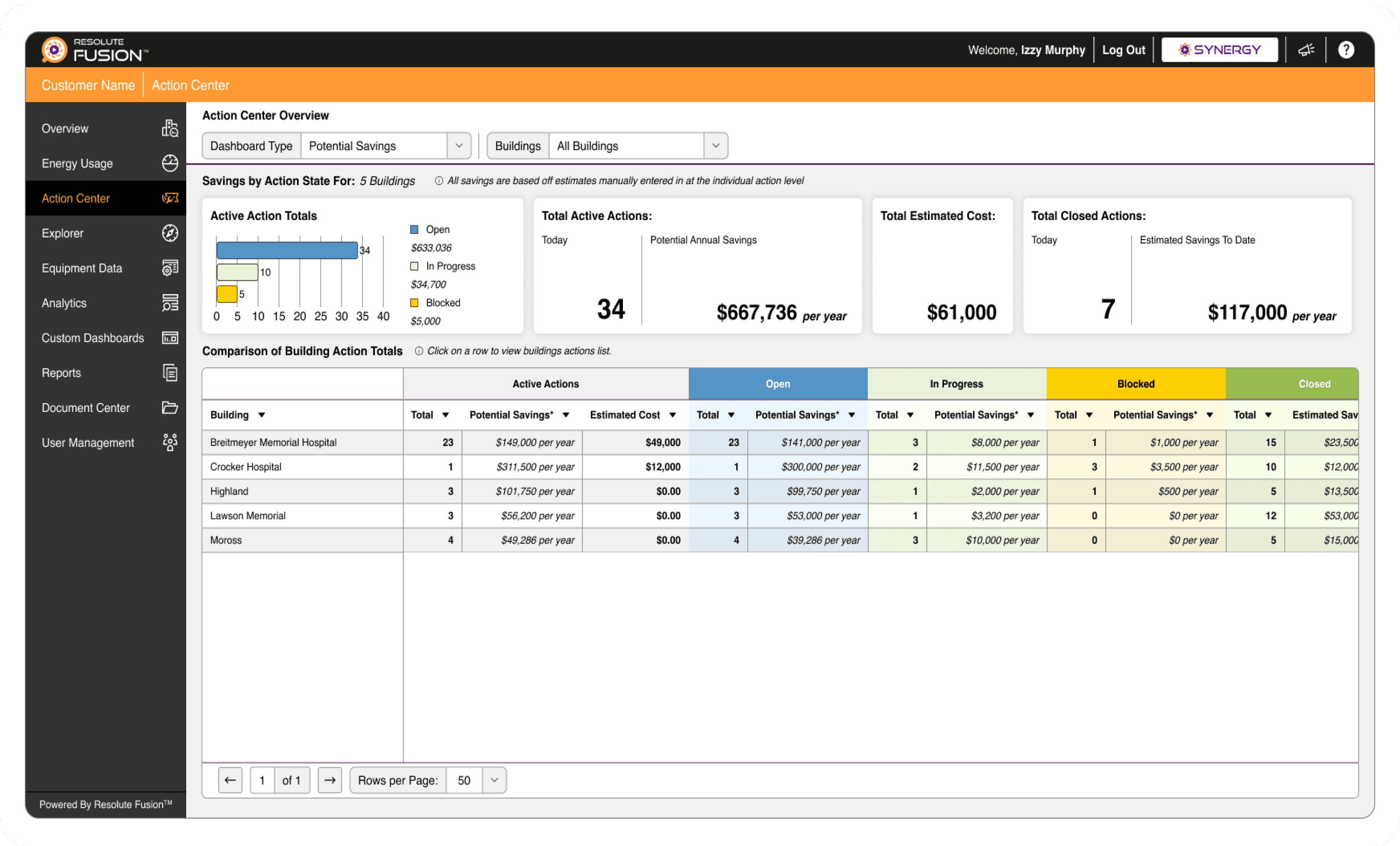
Action Center Overview (Existing)
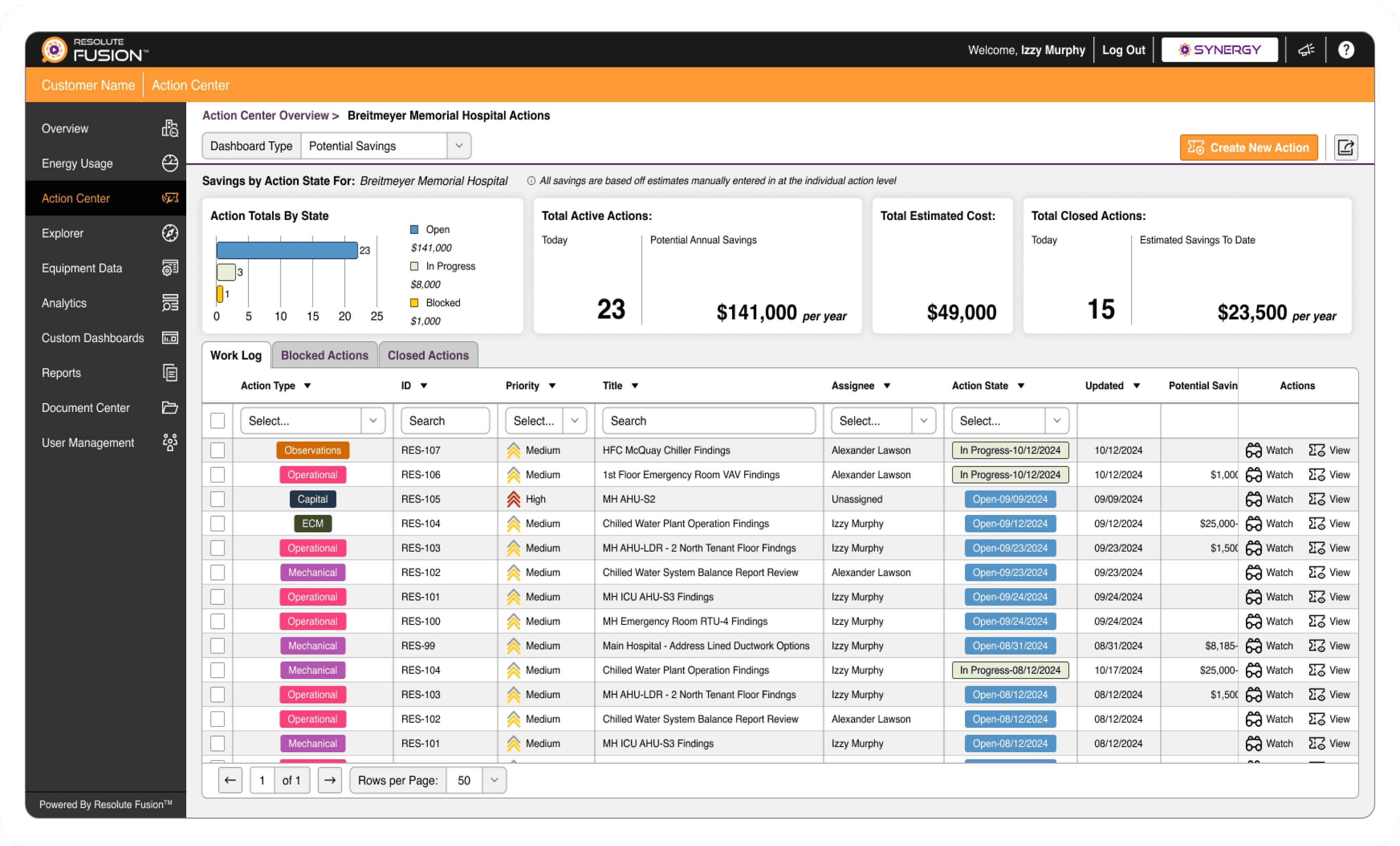
Action Items List (Existing)
Design Implications
Simplify the creation experience by structuring inputs around the core anatomy of an Action Item
Separate task management from analytical insights to reduce cognitive load and improve clarity
Elevate reporting features, such as Action State Comparisons and Potential Savings, into dedicated views rather than embedding them within task workflows
Expand the concept of Action Items beyond the building level to support portfolio-level visibility and management
Insights & Use Cases
Through documentation review, stakeholder input, and feature requests, several recurring pain points and needs emerged. To better understand their impact, I translated these into user-focused scenarios that reflect how Action Center is used in real workflows.
Fragmented Task Management
User Scenario
A service engineer responsible for managing a school district with 100+ buildings must navigate between buildings to track and manage Action Items. This lack of centralized visibility reduces efficiency and makes it difficult to prioritize work.
Pain Point & Requests
Action Items are isolated within individual buildings
No centralized way to manage tasks across a portfolio
Design Implications
Provide a centralized view to manage Action Items across the entire portfolio
Support filtering and custom views to help users quickly locate relevant tasks
Risk of Losing Work During Creation
User Scenario
A user is creating an Action Item and takes time to gather details, switching between tabs to ensure accuracy and calculate potential savings. When they attempt to submit the Action Item, their session has timed out and they are logged out, resulting in lost work.
Pain Point & Requests
No draft state
Users can lose work if they navigate away or their session times out
Design Implications
Introduce draft states to preserve progress
Implement auto-save functionality to reduce risk of data loss
Information Overload
User Scenario
A new user enters Action Center to help manage tasks. They are first presented with a building-level overview that includes totals, savings data, and comparisons. After navigating into a building, they encounter a dense table of Action Items with additional data layered in, making it difficult to focus on the tasks themselves.
Pain Point & Requests
KPI summaries, potential savings, and action state comparisons are mixed with task management
Difficult to quickly scan and prioritize information
Design Implications
Separate task management from analytical insights
Simplify the Action Items table to focus on key task information
Move KPI summaries and savings data into a dedicated dashboard experience
Improve Updates Around Action Items
User Scenario
A user creates an Action Item and assigns it to another team member. Over time, they stop receiving updates and later discover they were no longer subscribed to notifications for that item. They must manually re-subscribe and search through past emails to understand what they missed.
Pain Point & Requests
Not all updates trigger notifications
Notifications are limited to email, with no in-app tracking
Users can be unsubscribed from updates without clear awareness
Design Implications
Introduce an in-app inbox to track updates and activity
Ensure users are notified when they are unsubscribed from an Action Item, or restrict this action to the user themselves
Provide more consistent and reliable notification handling
The Design
The redesign of Action Center focused on addressing the key pain points identified during research. Each solution was designed to improve clarity, efficiency, and scalability while supporting real-world workflows across portfolios.
Centralized Task Management
Problem
Action Items were isolated within buildings, making it difficult to manage work across a portfolio.
Solution
Introduced a centralized Action Items view as the default experience, allowing users to track and manage tasks across all buildings in one place.
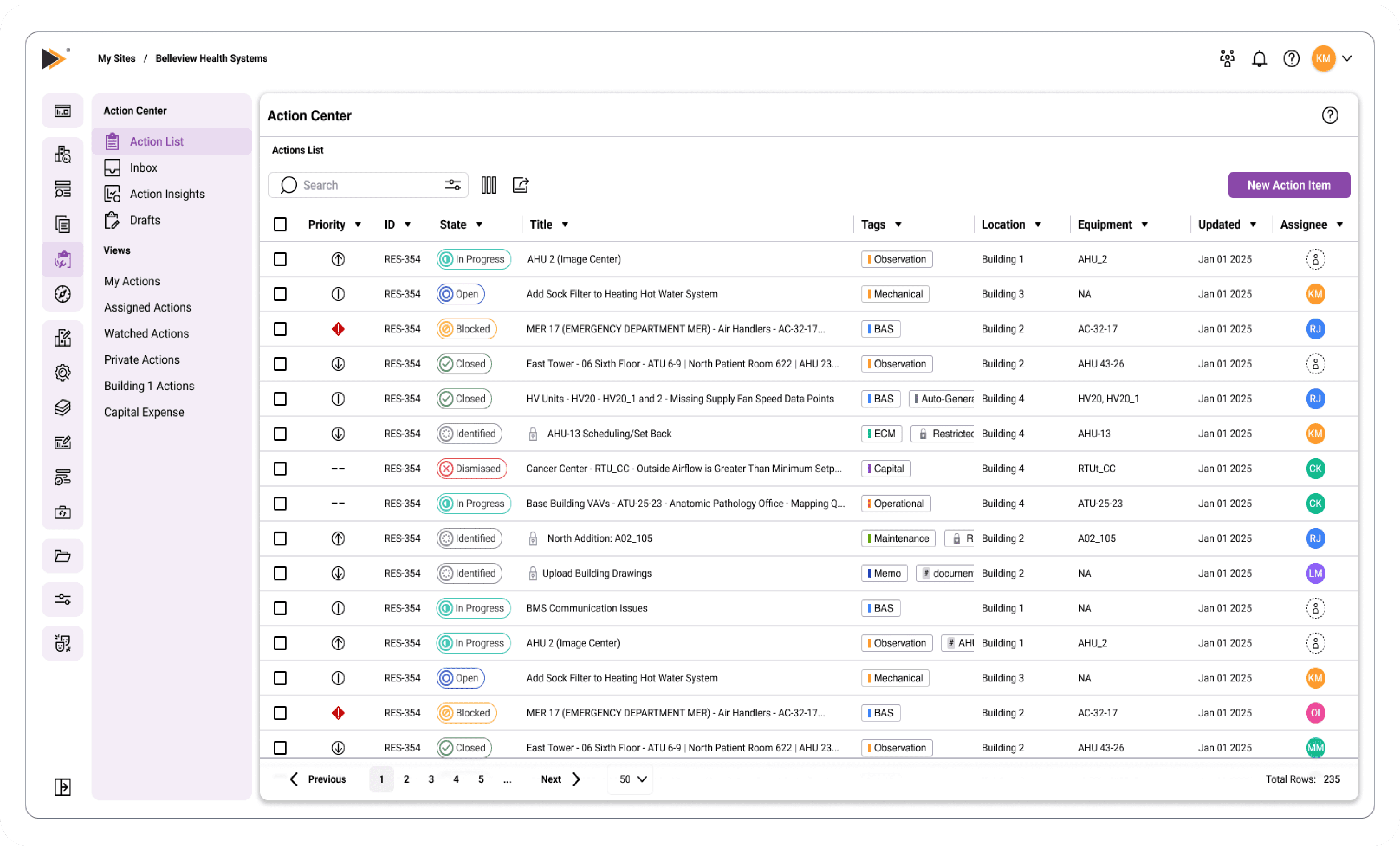
A centralized Action List is now the default view.
Key Improvements
Portfolio-level visibility across all Action Items
Filtering and custom views to quickly locate relevant tasks
Reduced need to navigate between buildings
Preventing Data Loss During Creation
Problem
Users could lose work due to lack of draft states or session timeouts.
Solution
Introduced draft states and auto-save functionality to preserve progress during Action Item creation.
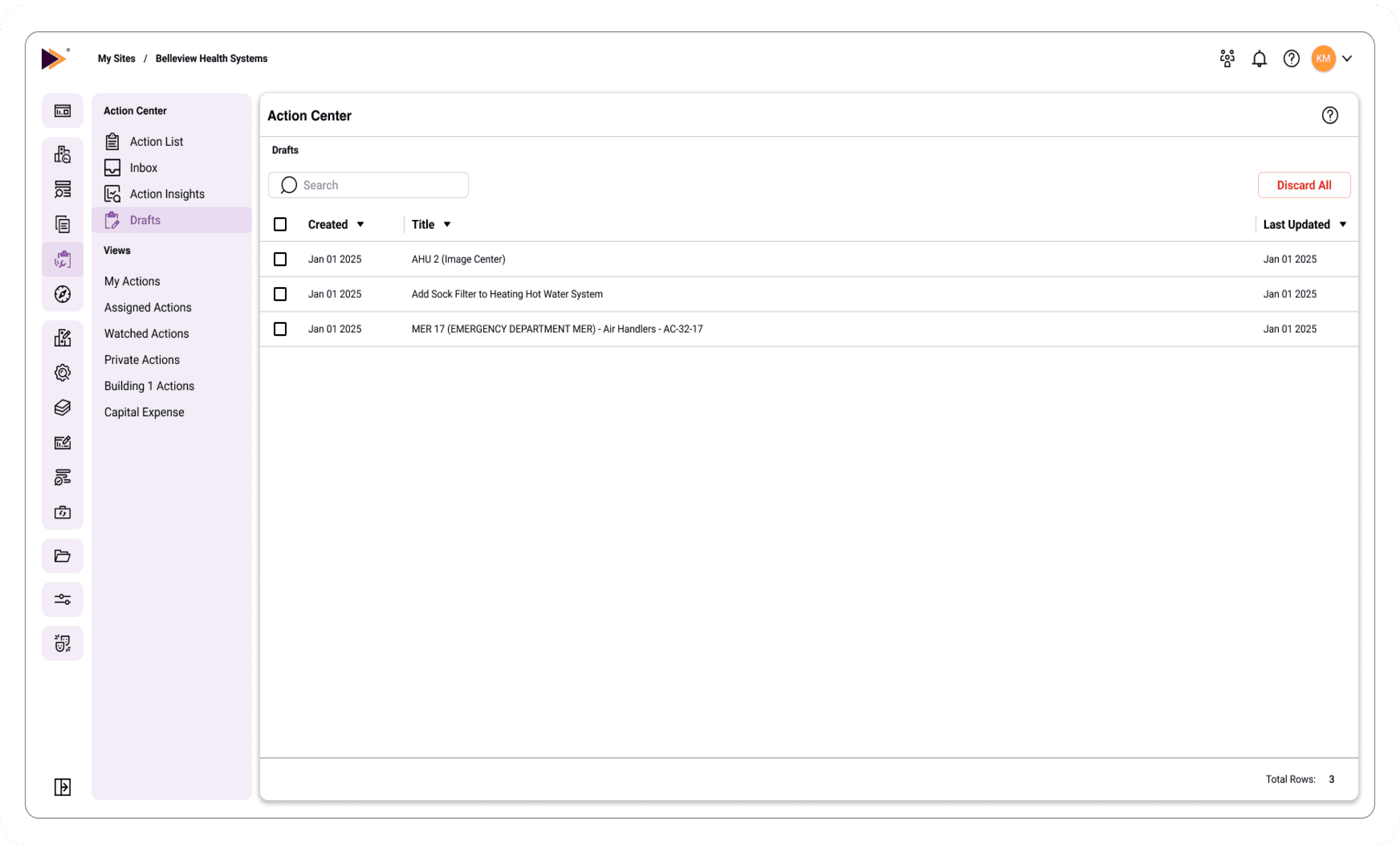
A dedicated Drafts page that show when it was created and last updated
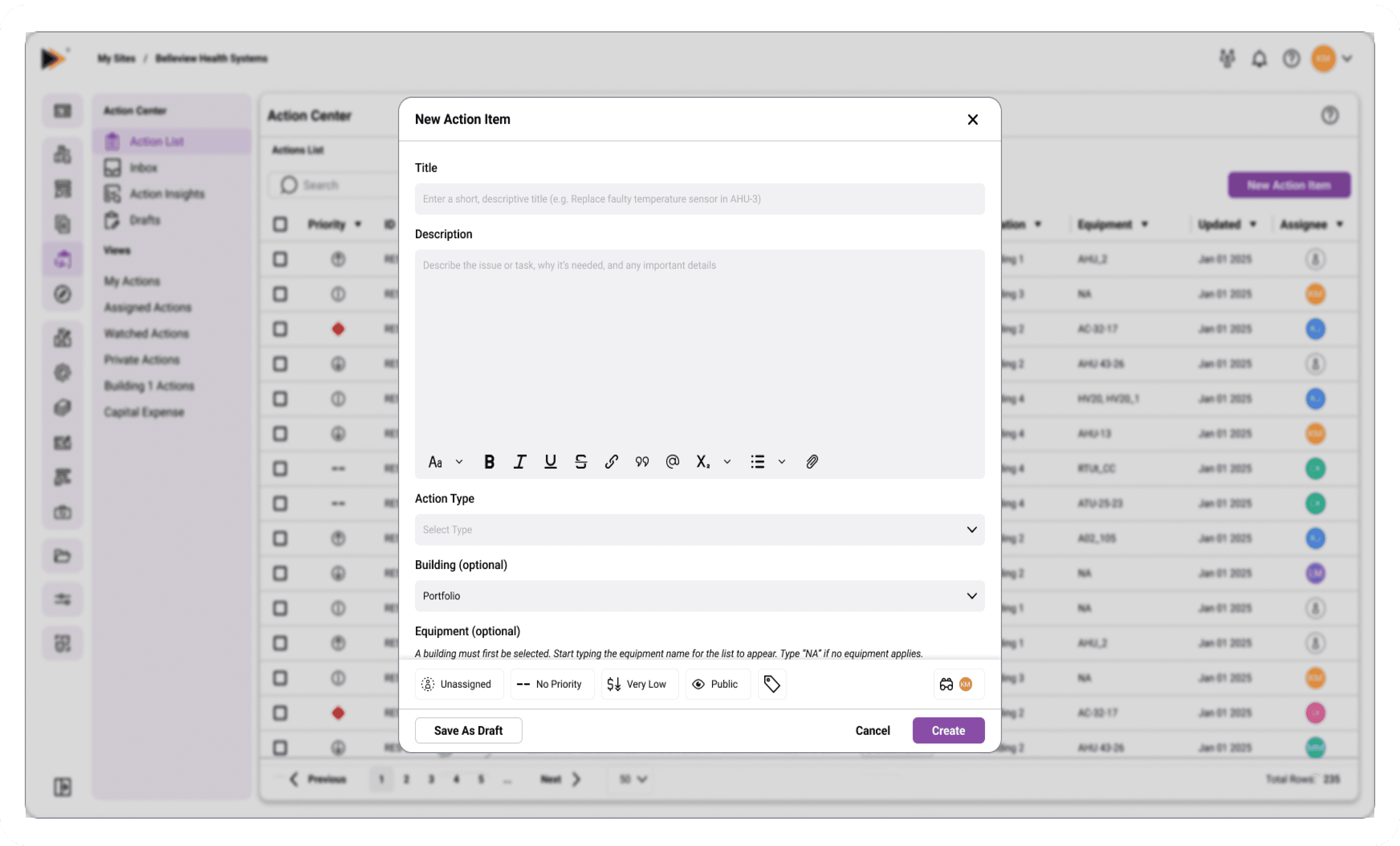
Action Item creation modal
Key Improvements
Draft state allows users to save work in progress
Auto-save reduces risk of losing data
Supports longer, more thoughtful input workflows
Reducing Information Overload
Problem
Task management and analytical insights were combined, making it difficult to focus on key actions.
Solution
Separated KPI summaries and reporting into a dedicated dashboard, while simplifying the Action Items table to focus on essential task information.
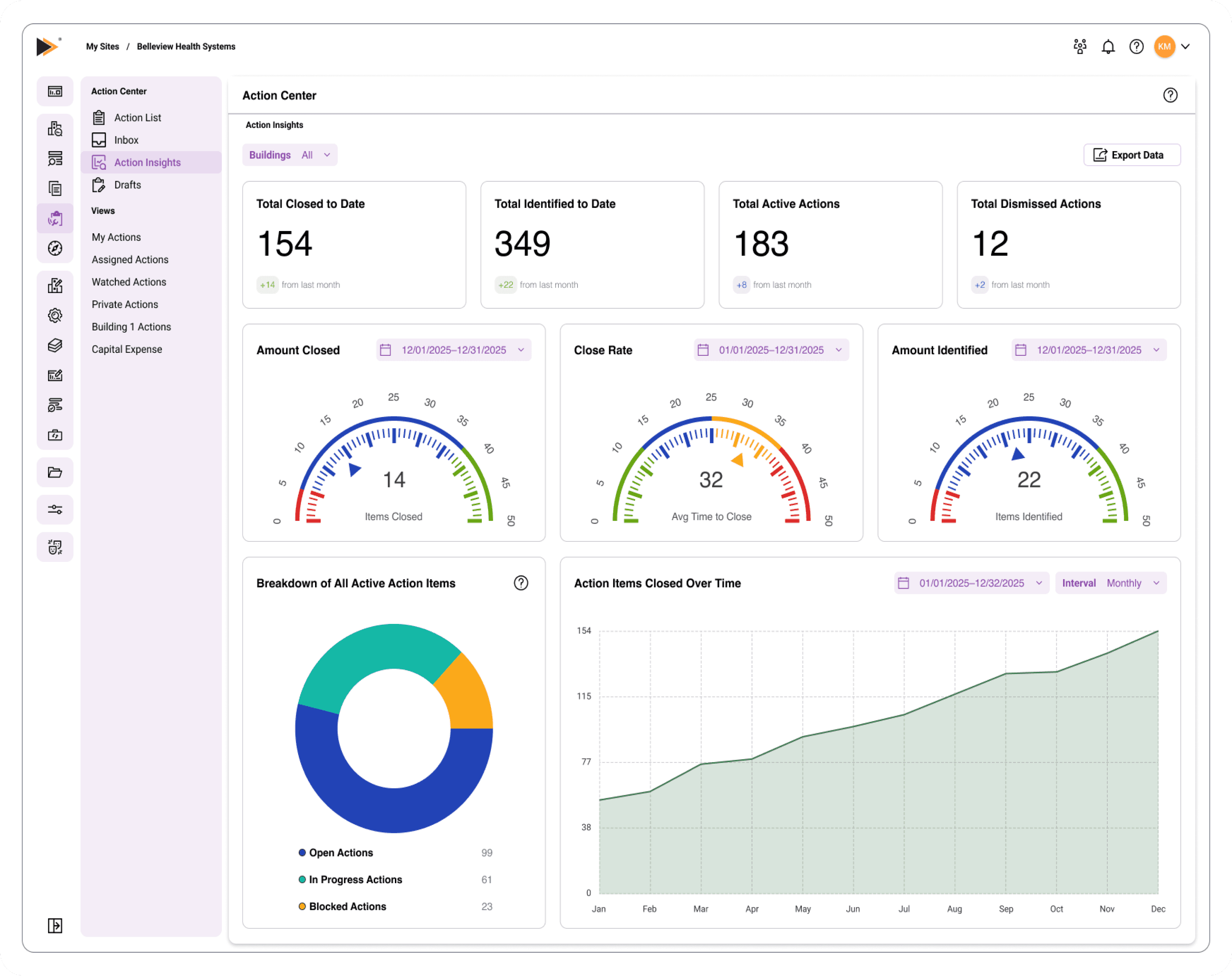
A dedicated dashboard separating performance insights from task management, allowing users to track trends, totals, and activity over time.
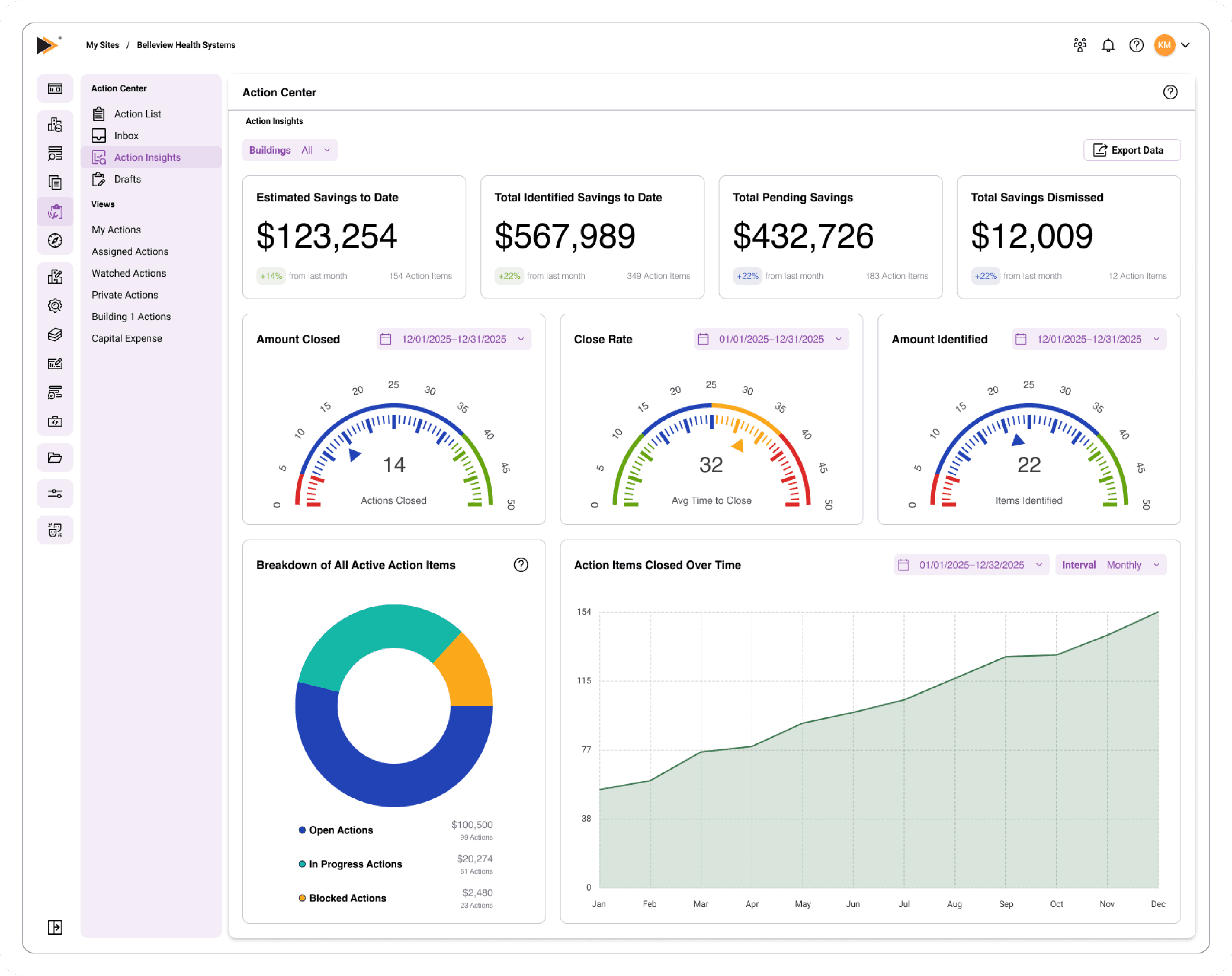
Optional savings view that integrates cost impact into the dashboard, allowing users to track potential value alongside performance without adding complexity to task workflows.
Key Improvements
Clear separation between insights and execution
Improved scanability of Action Items
Dedicated space for performance analysis
Improving Updates and Notifications
Problem
Users lacked visibility into updates and relied solely on email notifications.
Solution
Introduced an in-app inbox to track updates and activity across Action Items.
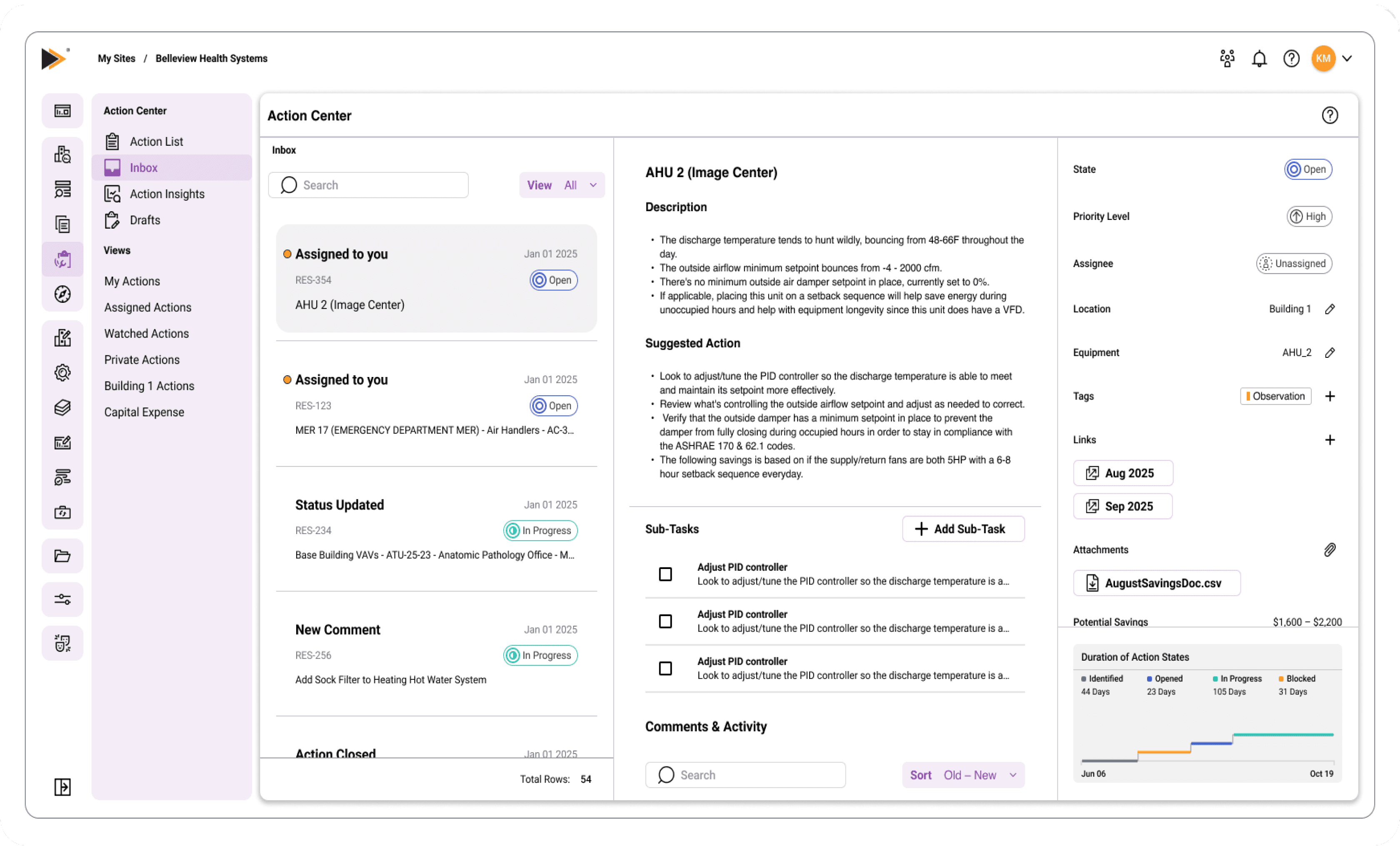
A dedicated Inbox to track updates and assignments
Key Improvements
Centralized location for updates and activity
Reduced reliance on email
Improved awareness of changes and assignments
Action Item Detail & Workflow Improvements
Problem
Editing an Action Item required entering a separate edit mode, interrupting the user’s workflow and adding unnecessary steps for simple updates. Additionally, action updates such as status changes, description edits, or savings updates were hidden behind an activity log accessed through a link at the bottom of the page. This separated updates from comments, making it difficult to follow the full history of activity in one place. For more complex Action Items, users also lacked a simple way to track smaller steps within a larger task.
Solution
Redesigned the Action Item detail view to support inline editing, surface action updates within the comments area, and introduce lightweight sub-task tracking. These changes reduce friction, improve visibility into activity, and align updates with how users naturally communicate and track progress.
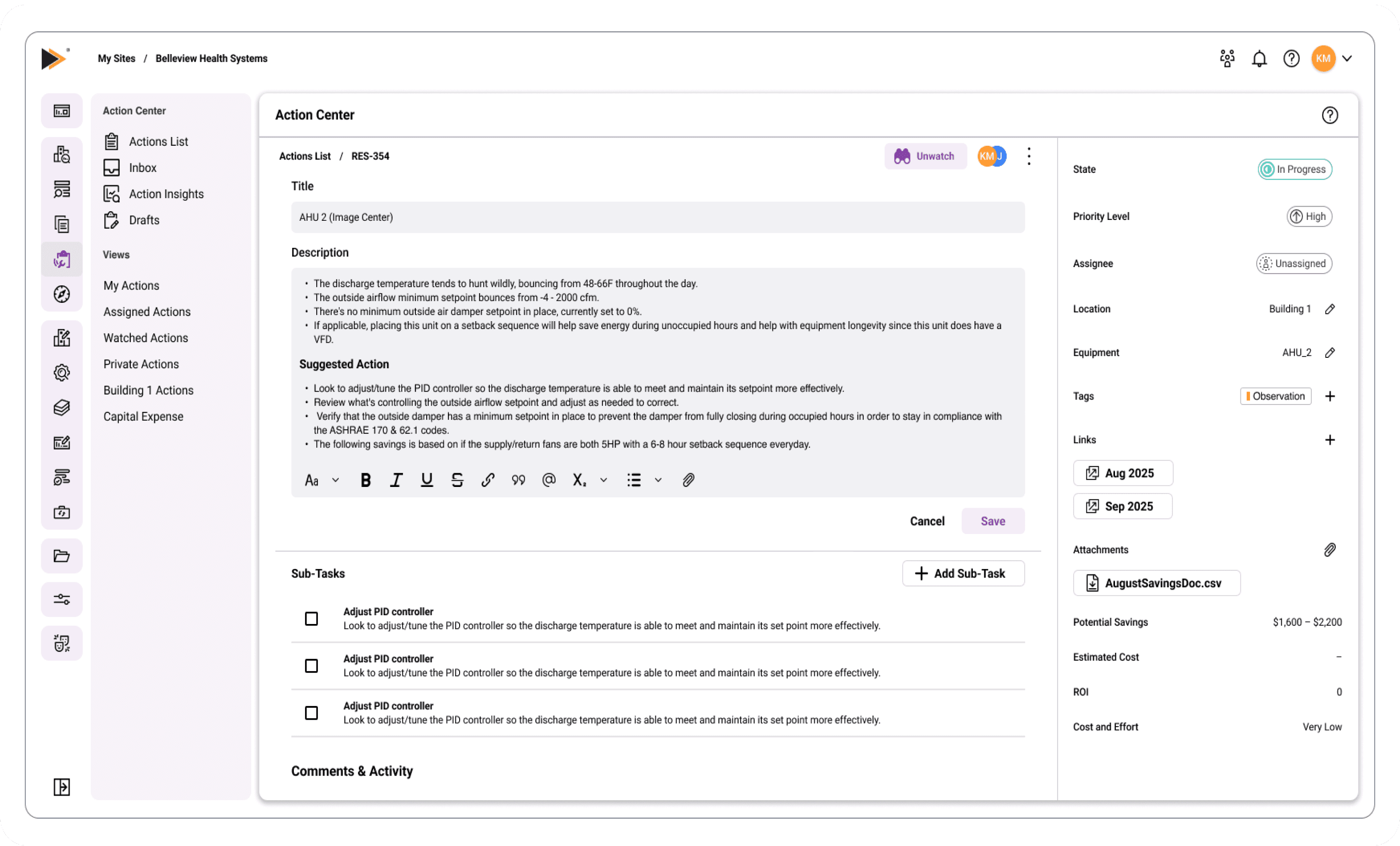
Inline editing removes the need for a separate edit mode, allowing users to make quick updates directly within the page.
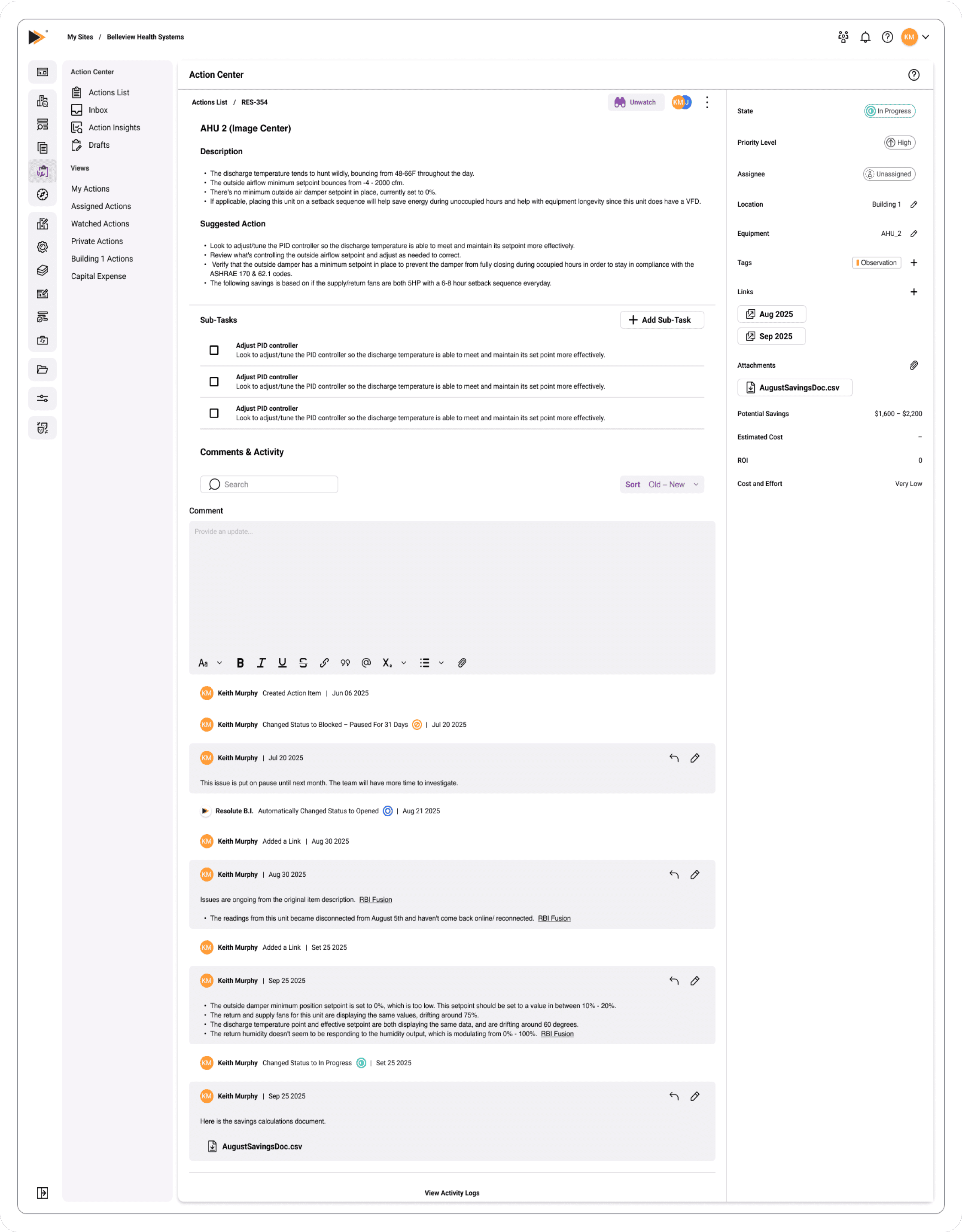
Action Item detail view showing sub-tasks alongside a unified comments and activity section.
Key Improvements
Enabled inline editing for key fields, allowing users to make updates directly within the page without switching modes
Removed the need for a separate edit view, keeping users in context and reducing interaction cost
Moved action updates out of a hidden activity log and into the comments section, making them immediately visible
Unified comments and updates into a single activity timeline, making it easier to follow the full history of an Action Item
Introduced sub-tasks as a lightweight checklist to help users track progress within larger Action Items
Simplified side panel interactions with dropdown-based edits that auto-save upon selection
Retained access to a full activity log for reviewing detailed history when needed
Expected Impact
The redesigned Action Center was partially implemented as part of an initial development phase, focusing on the core workflows of task management. While not all features were fully built out, the foundation established a more scalable and cohesive experience. The following outlines the expected impact of the full solution.
Improved Efficiency in Task Management
Centralized Action List reduces the need to navigate between buildings
Inline editing and simplified workflows reduce the number of steps required to update Action Items
Draft states and auto-save prevent loss of work and support longer, more thoughtful input
Increased Clarity and Focus
Separation of task management and insights reduces cognitive load
Simplified Action Item views make it easier to scan, prioritize, and act on tasks
Unified activity timeline improves visibility into updates and communication
Scalable Foundation for Future Growth
Dashboard and insights framework supports deeper analysis of performance and trends
Inbox introduces a centralized system for tracking updates beyond email
Flexible structure allows Action Center to expand as a core feature within the platform
Although not all features were fully implemented at the time, the redesign establishes a clear direction for evolving Action Center into a more efficient, scalable, and user-centered system.
Keith Murphy
Product Designer
2026
Contact
Email: kmurphy@themurphyfiles.com
Phone: (248) 878-5538
Social